Author: tpioadmin

  • Google Workspace Enhanced Audit Logs (2026 Update Guide)

    Google Workspace Enhanced Audit Logs (2026 Update Guide)

    Google Workspace Introduces Enhanced Audit Logs for Better Security Monitoring and Reporting

    Google Workspace is introducing a major enhancement to its Admin Audit Logs, aimed at improving administrative visibility, strengthening security monitoring, and enabling more accurate reporting across organizations. These updates are designed to provide IT administrators and security teams with deeper insights into admin-level activities across services like Gmail, Drive, account security settings, and app access…

    Google Workspace is introducing a major enhancement to its Admin Audit Logs , aimed at improving administrative visibility, strengthening security monitoring, and enabling more accurate reporting across organizations.

    These updates are designed to provide IT administrators and security teams with deeper insights into admin-level activities across services like Gmail, Drive, account security settings, and app access controls.

    Let’s explore what these enhancements mean and how they improve the overall audit logging experience in Google Workspace.

    Enhanced Visibility Into Administrative Activities

    With the latest improvements, Google Workspace is updating the schema of Admin Audit Log events to make administrative actions:

    • Easier to interpret
    • More structured
    • More detailed
    • Context-rich

    This allows organizations to better understand configuration changes across:

    • Account security settings
    • Gmail admin controls
    • Google Drive policies
    • App access permissions
    • Other admin-defined settings

    The improved log structure ensures that administrative activities are recorded with greater clarity and precision.

    Improved Log Event Accuracy Across Services

    One of the key updates includes enhancements to:

    • Event naming conventions
    • Event categorization
    • Activity type differentiation
    • Log event structuring

    These changes introduce improved event classification and structured data fields, helping organizations analyze administrative activity logs more efficiently and reduce ambiguity in reporting.

    As a result, IT teams can now distinguish configuration changes and policy updates more effectively across Workspace environments.

    Consistent Logging Across Integrated Tools

    The updated logging framework introduces consistency across audit log integrations used for monitoring, reporting, and analytics.

    Organizations accessing audit logs via:

    • AdminSDK / Reports API
    • Google Security Operations
    • Google Admin Console Security Investigation Tool
    • BigQuery

    will now benefit from aligned event structures across platforms.

    This consistency improves:

    • Dashboard reporting accuracy
    • Security automation workflows
    • SIEM integrations
    • Compliance tracking
    • Investigation processes

    Better Support for Reporting and Security Investigations

    The enhanced schema introduces more granular logging of administrative activities. This enables:

    • More precise activity tracking
    • Clearer audit trails
    • Improved investigation workflows
    • Reliable compliance reporting
    • Actionable security insights

    Security teams conducting administrative investigations can now generate more meaningful reports based on detailed event-level data.

    A Transition Toward a Future-Ready Logging Framework

    Google Workspace is providing a transition period from February 17 to August 17, 2026 , during which both existing and enhanced audit log events will be available.

    This allows organizations to:

    • Experience improved logging structures
    • Validate reporting workflows
    • Test monitoring environments
    • Familiarize with updated event schemas

    Beginning August 18, 2026 , the enhanced audit logging framework will become the standard across Google Workspace environments.

    Why These Improvements Matter

    These audit log enhancements support organizations in:

    • Strengthening governance practices
    • Improving compliance readiness
    • Monitoring configuration changes
    • Tracking administrative actions
    • Maintaining reporting accuracy
    • Detecting policy modifications

    With clearer and more granular logging, administrators gain improved visibility into Workspace activity—helping ensure a secure and well-governed digital environment.

    Final Thoughts

    With enhanced audit log event structures and improved schema consistency, Google Workspace continues to evolve its administrative monitoring capabilities.

    These updates empower organizations with improved transparency, reliable reporting, and more effective investigation support—making security monitoring more streamlined and insightful than ever before.

    As the enhanced logging framework becomes standard in August 2026, organizations can look forward to a more structured and future-ready audit logging experience within Google Workspace.
  • How to Avoid AnyDesk Scams: 5 Tips for Safe Remote Access (2025 Guide)

    How to Avoid AnyDesk Scams: 5 Tips for Safe Remote Access (2025 Guide)

    How to Avoid AnyDesk Scams: 5 Tips for Safe Remote Access (2025 Guide)

    Remote access tools like AnyDesk are powerful — they let users connect to their computers, manage servers, and offer IT support from anywhere. However, as these tools become mainstream in India’s digital workspace, cybercriminals are increasingly exploiting them for scams. In 2025, reports of tech support scams, fraudulent refund schemes, and unauthorized remote control attempts…

    Remote access tools like AnyDesk are powerful — they let users connect to their computers, manage servers, and offer IT support from anywhere. However, as these tools become mainstream in India’s digital workspace, cybercriminals are increasingly exploiting them for scams .

    In 2025, reports of tech support scams, fraudulent refund schemes, and unauthorized remote control attempts are still on the rise. The good news? These incidents can be completely avoided with a little awareness and the right security practices.

    In this guide, TechProfuse — India’s trusted IT solutions partner — explains how AnyDesk scams work and how you can use remote access safely and securely for both personal and business needs.

    1. Understand How AnyDesk Scams Work

    Scammers often pose as bank representatives, customer service agents, or technical support staff , convincing victims to install AnyDesk so they can “help” fix an issue or process a refund.

    Once access is granted, these attackers may:

    • Steal personal or financial data
    • Transfer money from online banking apps
    • Install malicious software
    • Lock users out of their own devices

    Remember: AnyDesk itself is legitimate, secure software , but scammers misuse it to gain control over unprotected devices. Understanding this difference is your first defense.

    2. Never Share Your AnyDesk Address or Access Code Publicly

    Every AnyDesk installation generates a unique address or ID that identifies your device. Scammers often trick users into sharing it over a call, chat, or fake website.

    ✅ Do:

    • Share your AnyDesk ID only with trusted IT personnel or verified support from within your organization.
    • Confirm the recipient’s identity before granting access.

    ❌ Don’t:

    • Post your AnyDesk ID or screenshots online.
    • Share it with anyone claiming to be from “the bank,” “Amazon,” “Flipkart,” or “tech support” unless verified.

    Once a scammer connects, they can see everything on your screen and potentially access private data — so be extremely cautious.

    3. Enable Security Settings Inside AnyDesk

    AnyDesk provides built-in tools to protect against unauthorized access. Before starting a session, take a few minutes to secure your installation:

    • Set a Strong Password for unattended access.
    • Use Two-Factor Authentication (2FA) to prevent hijacking attempts.
    • Restrict Interactive Access: Allow connections only from specific, trusted IDs or networks.
    • Enable “Allow Only Whitelisted Devices” for extra control.
    • Check Session Logs Regularly under Settings → Security → Sessions to monitor who accessed your system.

    These steps ensure that only you or authorized users can initiate or approve a remote session.

    4. Download AnyDesk Only from the Official Source

    Cybercriminals frequently create fake AnyDesk websites or APKs that look authentic but contain spyware or trojans. These are often shared through phishing emails, SMS links, or search ads .

    ✅ Always download AnyDesk from the official domain: 🔗 https://anydesk.com

    Avoid downloading from:

    • Third-party app stores
    • Pop-up links
    • Attachments in unsolicited emails

    On mobile, install only through the Google Play Store or Apple App Store under the verified publisher AnyDesk Software GmbH .

    5. Stay Alert for Common Scam Signs

    Here are red flags that typically signal a remote-access scam in progress:

    🚨 Pressure or Urgency: The caller insists your “account is blocked” or you must act immediately. 🚨 Refund or Payment Requests: They ask you to open a banking app or transfer money while sharing your screen. 🚨 Unverified Calls or Chats: You receive messages from unofficial numbers claiming to represent support teams. 🚨 Requests for OTPs or Passwords: No genuine company or IT partner will ever ask for these.

    If you encounter any of these, hang up and disconnect the session immediately using the red disconnect button in AnyDesk.

    Bonus Tip: Use a Trusted IT Partner

    If your company uses AnyDesk for business operations, partnering with a certified IT solutions provider like TechProfuse can help safeguard your infrastructure.

    TechProfuse helps organizations:

    • Configure secure, policy-based remote access systems
    • Set up multi-factor authentication and device controls
    • Manage licenses and user roles through centralized administration
    • Train employees on recognizing social engineering threats

    By having your setup managed by experts, you ensure your team uses AnyDesk safely while meeting corporate compliance standards.

    What to Do If You Think You’ve Been Scammed

    If you suspect unauthorized access or fraudulent activity:

    • Disconnect from the internet immediately.
    • Uninstall AnyDesk or revoke session permissions.
    • Change passwords for your online accounts and enable 2FA.
    • Scan your device with an updated antivirus solution.
    • Report the incident to your bank and local cybercrime cell (in India, you can report at https://cybercrime.gov.in ).

    Quick action can prevent further damage and data loss.

    Safe Remote Access Starts with Awareness

    Remote tools like AnyDesk are vital for productivity — but like any technology, they require responsible use. By knowing the warning signs, securing your setup, and verifying every request for remote access, you can protect both personal and corporate data.

    TechProfuse helps Indian businesses deploy and manage AnyDesk safely, ensuring speed, compliance, and cybersecurity at every level.

    Ready to deploy AnyDesk securely for your team?

  • Office 365 Expired? Here’s What Happens and How to Quickly Renew It

    Office 365 Expired? Here’s What Happens and How to Quickly Renew It

    Office 365 Expired? Here’s What Happens and How to Quickly Renew It

    You open Outlook — and suddenly see a message that your Office 365 subscription has expired. Your emails stop syncing, documents go read-only, and panic sets in. Don’t worry — your data isn’t lost. You just need to understand what happens after expiry and how to renew quickly. At TechProfuse, a Microsoft Certified Partner in…

    You open Outlook — and suddenly see a message that your Office 365 subscription has expired. Your emails stop syncing, documents go read-only, and panic sets in.

    Don’t worry — your data isn’t lost. You just need to understand what happens after expiry and how to renew quickly.

    At TechProfuse , a Microsoft Certified Partner in India , we specialize in fast Office 365 renewals, license restoration, and business continuity support — ensuring you’re never locked out of your essential Microsoft 365 tools.

    What Happens When Your Office 365 Subscription Expires

    Microsoft 365 Copilot is an AI-powered productivity companion built directly into familiar Microsoft apWhen your Microsoft 365 (formerly Office 365) subscription lapses, it doesn’t shut down immediately — Microsoft follows a clear, three-stage process to give you time to renew.

    1. Grace Period (First 30 Days)

    • You can still access all Microsoft 365 apps and data.
    • Renewal reminders start showing up in your dashboard and email.
    • Admins can renew anytime without data loss or service interruption.

    2. Suspended State (31–60 Days)

    • Users lose access to services like Outlook, OneDrive, and Teams.
    • Data is retained but locked — you can’t edit, send, or upload.
    • Admins can still renew and instantly restore full access.

    3. Data Deletion Period (After 60 Days)

    • Microsoft begins permanent deletion of data across all connected services.
    • Emails, files, and settings may be unrecoverable after this stage.

    💡 Note: Renewing during the grace or suspension period ensures zero data loss and instant reactivation .

    How to Check If Your Office 365 Subscription Has Expired

    If you’re unsure of your subscription status, here’s how to confirm it:

    • Visit admin.microsoft.com and sign in as an admin.
    • Go to Billing → Your Products .
    • Check the status beside your plan — Active , Expired , or Suspended .
    • If it’s expired, click Renew Subscription to restart your plan.

    💡 Pro Tip: If you purchased through a Microsoft Partner like TechProfuse , simply contact our support team. We’ll renew your licenses instantly — no credit card or international billing hassles .

    How to Renew Your Office 365 Subscription Quickly

    Microsoft offers two renewal options. Here’s how they work:

    Option 1: Renew Directly from Microsoft

    • Log in to your Microsoft 365 admin account .
    • Click Renew next to your subscription.
    • Choose a billing cycle — monthly or annual.
    • Pay using your saved payment method.

    Option 2: Renew Through a Microsoft Partner (Recommended)

    Renewing via a certified partner like TechProfuse offers key advantages:

    • 💰 Local INR Billing: Avoid currency conversions and foreign transaction fees.
    • ⚡ Instant Activation: Renewal handled instantly with verified Microsoft partner credentials.
    • 👥 Multi-User Support: Manage all licenses under one consolidated account.
    • 🛠️ Expert Help: Includes data backup, plan upgrades, and technical support.

    Can You Still Access Files and Emails After Expiry?

    Here’s what you can and can’t do after your Office 365 license expires:

    ✅ Emails: Still available via Outlook Web Access during the grace period. ✅ Files: Safely stored in OneDrive or SharePoint but become read-only. ❌ Editing: Disabled until the subscription is renewed.

    ⚠️ Warning: Once your account enters the data deletion phase , Microsoft permanently removes your stored data — and it cannot be recovered.

    Common Reasons Office 365 Subscriptions Expire

    Subscription lapses are more common than you think. Some typical causes include:

    • Expired credit cards or failed auto-payments
    • Admins leaving the organization without transfer of ownership
    • Missed renewal notifications
    • Business restructuring or license mismanagement

    💡 TechProfuse Advantage: “Our managed Microsoft 365 services include license tracking , automated renewal alerts , and consolidated billing — preventing unexpected downtime.”

    Tips to Avoid Office 365 Expiry in the Future

    Stay proactive and you’ll never face service interruption again.

    • 🔔 Enable Renewal Reminders: Set up alerts in your Microsoft 365 admin console.
    • 👥 Consolidate Licenses: Manage all users under one central account.
    • 🤝 Partner with TechProfuse: Get automatic renewals with local billing and dedicated support.
    • 💾 Back Up Your Data: Regularly back up critical files on OneDrive or SharePoint.

    How TechProfuse Simplifies Office 365 Renewal

    With TechProfuse , renewing or upgrading your Office 365 subscription is fast, reliable, and effortless:

    • ✅ Quick renewal — even for suspended accounts
    • 🔄 Plan upgrades or downgrades as needed
    • 🧾 Consolidation of multiple subscriptions under one invoice
    • 💸 Local INR billing with GST-compliant invoices
    • ☎️ 24/7 Microsoft-certified support

    “Over 400+ Indian businesses trust TechProfuse for Microsoft 365 renewals, migrations, and managed cloud services.”

    Ready to Reactivate Your Office 365 Account?

    Don’t lose access to your email, files, or Teams data. Renewing your Office 365 subscription takes just minutes — and TechProfuse can handle the entire process for you.

    Your trusted Microsoft Partner in India for fast Office 365 renewals, plan upgrades, and seamless business continuity.

  • A Comprehensive Look at Microsoft 365 Copilot: Features, Pricing, and Use Cases

    A Comprehensive Look at Microsoft 365 Copilot: Features, Pricing, and Use Cases

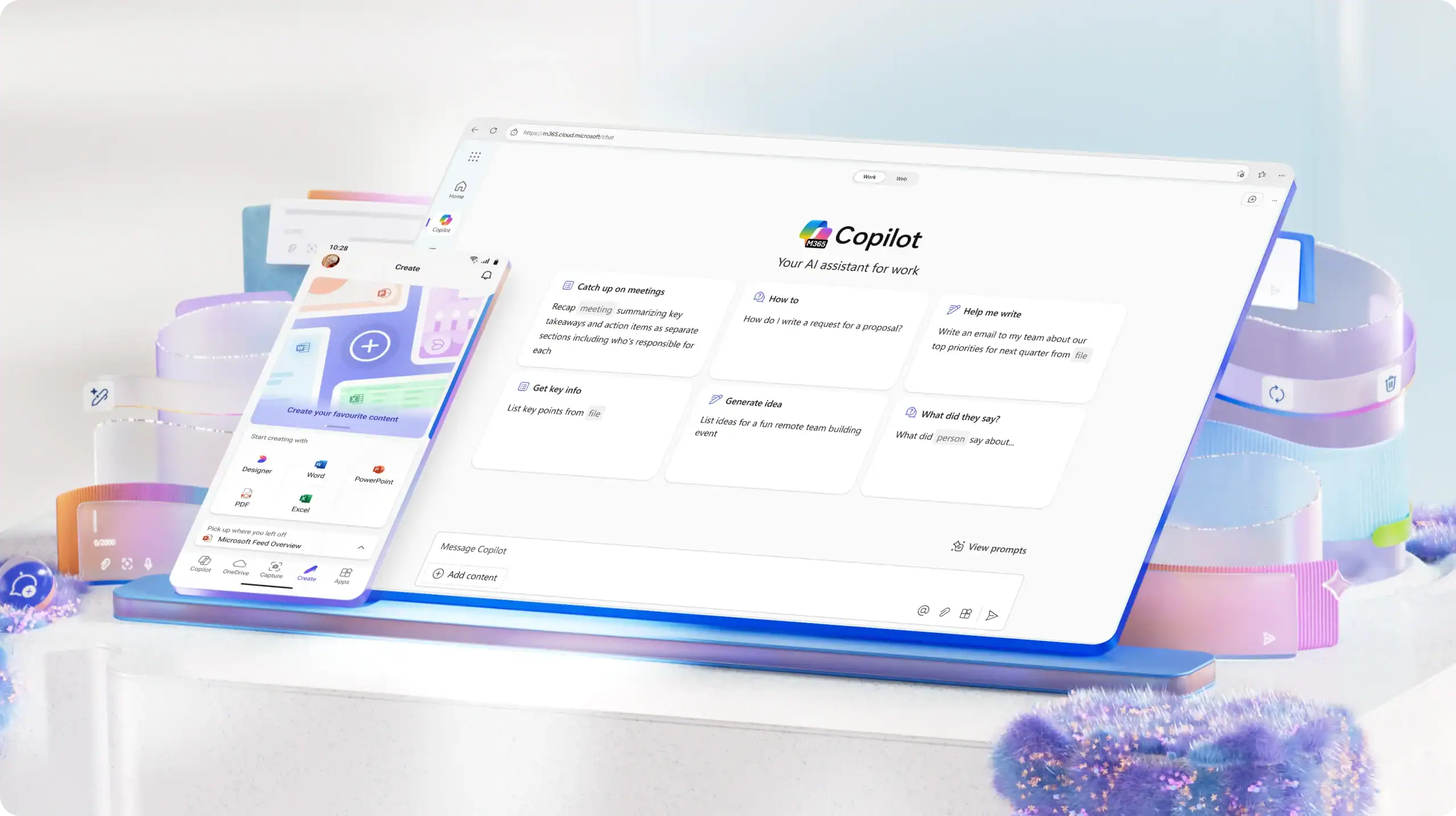
    Artificial intelligence is redefining workplace productivity in 2025. From automating daily tasks to generating insights in seconds, AI is no longer just a futuristic concept — it’s a practical tool transforming how teams work. At the center of this transformation is Microsoft 365 Copilot — an intelligent AI assistant that combines the power of large…

    Artificial intelligence is redefining workplace productivity in 2025 . From automating daily tasks to generating insights in seconds, AI is no longer just a futuristic concept — it’s a practical tool transforming how teams work.

    At the center of this transformation is Microsoft 365 Copilot — an intelligent AI assistant that combines the power of large language models (LLMs) with the context of your business data from Microsoft Graph (emails, chats, documents, and meetings).

    TechProfuse , a certified Microsoft solutions partner in India , helps businesses adopt Copilot seamlessly — from licensing and deployment to training and support.

    “From drafting reports to analyzing spreadsheets — Microsoft 365 Copilot brings the power of AI directly into your daily workflow.”

    What Is Microsoft 365 Copilot?

    Microsoft 365 Copilot is an AI-powered productivity companion built directly into familiar Microsoft apps like Word, Excel, PowerPoint, Outlook, and Teams .

    It understands natural language commands, generates content, summarizes data, and automates complex processes — all while maintaining enterprise-grade security and privacy .

    Powered by:

    • Microsoft Graph: Connects to your organization’s emails, documents, meetings, and chats.
    • Azure OpenAI Service: Delivers advanced language understanding and generation capabilities.

    Built-In Compliance & Security: Ensures your company data stays private and protected within the Microsoft Cloud.e.365 the preferred choice for hybrid and remote work models adopted by businesses across India.

    Microsoft 365 Copilot Key Features

    Here’s how Copilot enhances productivity across Microsoft 365 applications:

    1. Copilot in Word

    Write, edit, and summarize documents using natural prompts.

    Example: “Draft a project proposal based on the latest meeting notes.”

    2. Copilot in Excel

    Analyze trends, create visual charts, and summarize large datasets instantly.

    Example: “Show top-performing sales regions in Q2 and visualize in a bar chart.”

    3. Copilot in PowerPoint

    Generate professional presentations in seconds.

    Example: “Create a 5-slide deck on our new marketing strategy using this Word document.”

    4. Copilot in Outlook

    Summarize long email threads, extract key action items, and draft quick replies automatically.

    5. Copilot in Teams

    Get meeting summaries, key discussion points, and follow-up tasks — even if you missed the call.

    Bonus: Microsoft is also integrating Copilot across Loop, Whiteboard, and OneNote for smarter brainstorming and note-taking.

    Microsoft 365 Copilot Pricing in India

    Microsoft 365 Copilot is available as an add-on to select Microsoft 365 plans, including E3, E5, Business Standard, and Business Premium .

    • Indicative Global Price: $30 per user/month ( approx. ₹2,500 in India; pricing may vary )
    • Availability: Rolling out progressively to enterprise and business customers through authorized partners like TechProfuse

    While Copilot is an additional investment, its ROI is substantial — saving employees hours of manual work every week and driving smarter, faster business outcomes.

    Use Cases: How Businesses Are Leveraging Microsoft 365 Copilot

    Copilot isn’t just a tool — it’s a game-changer across departments and industries.

    For Marketing Teams

    Generate campaign briefs, draft blog outlines, and analyze performance reports — all with a single prompt.

    For Finance Departments

    Automate monthly budgeting, detect spending trends, and forecast revenue in Excel.

    For Sales Teams

    Create proposal templates, follow-up emails, and CRM updates directly from Teams chats or Outlook threads.

    For HR & Operations

    Draft job descriptions, onboarding plans, and employee survey summaries in minutes.

    For Executives & Leadership

    Get AI-generated digests of meetings, project updates, and email insights to make faster, data-driven decisions. needs.

    Benefits of Microsoft 365 Copilot for Businesses

    Increased Productivity: Automates repetitive work and reporting.

    Better Decision-Making: Delivers insights from real company data via Microsoft Graph.

    Enhanced Creativity: Helps teams generate ideas, presentations, and reports effortlessly.

    Consistent Quality: Reduces human error and improves document accuracy.

    Data Security: Operates entirely within Microsoft’s secure, compliant cloud ecosystem.

    Microsoft 365 Copilot vs Other AI Tools

    Here’s why Copilot stands apart from typical AI writing or chatbot tools:

    • Deep Integration: Works natively within Microsoft Word, Excel, Outlook, and Teams.
    • Enterprise-Grade Security: Data never leaves your Microsoft 365 environment.
    • Context-Aware Intelligence: Understands your organization’s unique data and workflows.

    “Copilot doesn’t just generate — it understands your workflow, your files, and your goals.”

    How TechProfuse Helps Businesses Implement Microsoft 365 Copilot

    As a Microsoft Certified Partner , TechProfuse ensures your organization gets the full benefit of Copilot with a smooth, secure rollout.

    1. Licensing & Subscription Setup

    Get official Microsoft 365 Copilot add-ons through certified reseller channels.

    2. Deployment & Configuration

    We handle secure deployment across all users with zero disruption.

    3. Training & Adoption Support

    Empower your teams to use Copilot effectively with guided training sessions.

    4. Ongoing Cloud Support

    Enjoy continuous monitoring, optimization, and updates from cloud-certified experts.

    Our specialists ensure Copilot integrates seamlessly with your existing Microsoft 365 setup — enhancing productivity while keeping your data secure.

    The Future of Work with Microsoft 365 Copilot

    AI isn’t replacing employees — it’s empowering them . Microsoft 365 Copilot marks the beginning of a new era where teams focus on innovation and strategy, while AI handles the repetitive, time-consuming tasks.

    2025 is the year to embrace intelligent productivity. Don’t get left behind.

  • Unlock the Best Google Workspace Price with us | India Reseller

    Unlock the Best Google Workspace Price with us | India Reseller

    Unlock the Best Google Workspace Price with us | India Reseller

    Every business today depends on reliable communication, secure data storage, and effortless collaboration. Google Workspace (formerly G Suite) delivers all three — combining Gmail, Drive, Meet, and Docs into one powerful ecosystem for productivity and teamwork. But choosing the right plan at the right price can be confusing, especially with international billing and varying plan…

    Every business today depends on reliable communication, secure data storage, and effortless collaboration. Google Workspace (formerly G Suite) delivers all three — combining Gmail, Drive, Meet, and Docs into one powerful ecosystem for productivity and teamwork.

    But choosing the right plan at the right price can be confusing, especially with international billing and varying plan options. That’s where TechProfuse comes in — a trusted Google Workspace reseller in India , helping businesses get genuine licenses, local INR billing, and complete setup support at the most competitive prices.

    Why pay more when you can get the same Google Workspace features — with better support and savings?

    Understanding Google Workspace Pricing in India

    Google Workspace pricing is structured differently across regions and depends on your team’s size and billing preferences. In India, the final cost varies based on the plan, number of users, and whether you opt for monthly or annual billing.

    Here’s a quick look at the typical plans and pricing available in India:

    Note: Prices may vary based on currency rates and subscription duration.

    Why Buy Google Workspace from an Authorized Reseller in India

    Purchasing Google Workspace through a certified reseller like TechProfuse offers more than just convenience — it brings real business advantages.

    • Local INR Billing: No need for international cards or foreign exchange fees.
    • End-to-End Support: Get help with setup, configuration, and migration.
    • Instant Activation: Quick onboarding for new users and domains.
    • Custom Plans: Mix and match plans based on team requirements.
    • Priority Assistance: Speak directly to human experts, not automated support bots.

    When you buy Google Workspace through TechProfuse, you get both affordability and accountability — ensuring every license works smoothly for your team.

    Value Beyond Pricing: What You Get with TechProfuse

    Choosing TechProfuse means more than just cost savings — it’s about long-term value and reliable partnership.

    1. Hassle-Free Setup & Migration

    We help you move seamlessly from existing platforms like Outlook, Zoho, or cPanel — with zero data loss and minimal downtime.

    2. Managed Admin & Security Support

    Our experts handle user management, permissions, backups, and security settings, so your team can focus on business growth.

    3. Training & Adoption Support

    Empower your employees with practical training on Gmail, Drive, Meet, and Docs to improve collaboration and productivity.

    4. Flexible Scalability

    Add or remove licenses as your team changes — pay only for what you use, when you use it.

    Comparing Reseller Benefits vs Direct Google Purchase

    With TechProfuse, you get local expertise, faster support, and customized solutions — not just a license.

    How to Choose the Right Google Workspace Plan for Your Team

    Selecting the right plan depends on your team size, workflow, and security needs:

    • Startups & Freelancers: Business Starter – ideal for basic email and file storage.
    • Growing SMBs: Business Standard – advanced collaboration tools and 2 TB storage per user.
    • Large Teams: Business Plus – additional security, admin control, and audit logs.
    • Enterprises: Enterprise Plans – custom solutions for compliance, analytics, and large-scale management.

    Not sure which plan fits your team? TechProfuse experts can analyze your requirements and recommend the most cost-effective option.

    Why Businesses Across India Choose TechProfuse

    Businesses across industries trust TechProfuse for their Google Workspace needs — from startups to established enterprises.

    • Certified Google Cloud Partner in India
    • 500+ Workspace implementations across IT, education, and manufacturing sectors
    • Dedicated onboarding and IT support for smooth transitions
    • Transparent pricing with no hidden costs

    “TechProfuse helped us migrate over 200 users to Google Workspace with zero downtime — and saved us nearly 20% on licensing costs.”

    Get the Best Google Workspace Deal in India Today

    Upgrade your business communication and collaboration — without overspending or struggling with foreign payments.

    TechProfuse ensures you get the best Google Workspace price in India, backed by reliable local support, expert guidance, and end-to-end setup.

  • Microsoft 365 Solutions in India | Partner with Certified Cloud Experts

    Microsoft 365 Solutions in India | Partner with Certified Cloud Experts

    Microsoft 365 Solutions in India | Partner with Certified Cloud Experts

    Digital transformation is reshaping how companies operate, collaborate, and secure data. In this era of hybrid work and cloud-first operations, Microsoft 365 has become the foundation of modern workplaces — uniting productivity, communication, and security under one intelligent ecosystem. As a Microsoft Certified Partner in India, TechProfuse helps organizations harness the full potential of Microsoft…

    Digital transformation is reshaping how companies operate, collaborate, and secure data . In this era of hybrid work and cloud-first operations, Microsoft 365 has become the foundation of modern workplaces — uniting productivity, communication, and security under one intelligent ecosystem.

    As a Microsoft Certified Partner in India , TechProfuse helps organizations harness the full potential of Microsoft 365 through expert consulting, seamless migration, and ongoing managed support . From SMBs to large enterprises, TechProfuse empowers businesses to simplify workflows, enhance collaboration, and ensure cloud security at scale.

    Why Microsoft 365 Is the Backbone of Modern Business Operations

    The modern workplace depends on connected tools and secure access . Microsoft 365 delivers exactly that — integrating everyday applications such as Word, Excel, Outlook, Teams, OneDrive, and SharePoint into a unified platform.

    Businesses across India rely on Microsoft 365 to enable:

    • 🔒 Secure Cloud Collaboration – Work from anywhere without compromising data integrity.
    • 🌐 Remote Team Connectivity – Stay connected via Teams and shared online workspaces.
    • 📊 Real-Time Data Sharing – Sync and co-edit files instantly with version control.
    • ⚙️ Business Continuity & Compliance – Maintain operations and meet industry regulations.

    Whether you’re a growing startup or a large enterprise, Microsoft 365 provides the flexibility and reliability today’s organizations need to thrive.365 the preferred choice for hybrid and remote work models adopted by businesses across India.

    Comprehensive Microsoft 365 Solutions from TechProfuse

    At TechProfuse, every business engagement begins with understanding your unique environment — then delivering tailored Microsoft 365 solutions designed for performance and compliance.

    1. Cloud Migration Services

    Seamlessly transition from legacy or on-premise systems to Microsoft 365 with zero data loss and minimal downtime .

    2. Deployment & Configuration

    Custom setup for users, devices, and workflows — ensuring secure access , policy alignment , and optimal performance .

    3. Managed Services & Support

    Proactive monitoring, updates, and user management that keep your Microsoft environment running efficiently.

    4. Security & Compliance Solutions

    Implement identity protection , conditional access , and data governance frameworks suited for Indian regulatory needs.

    5. Productivity Training & Adoption

    Boost adoption through customized training sessions — helping teams use tools like Teams, OneDrive, and Power Automate to their full potential.

    Benefits of Partnering with a Certified Microsoft Cloud Expert

    Working with a Microsoft Certified Partner like TechProfuse goes beyond basic licensing — it’s about long-term value and expert guidance.

    When you choose TechProfuse, you get:

    • ✅ Expert plan selection — Choose the right tier (Business Basic, Standard, Premium, or Enterprise).
    • 💰 Localized INR billing and streamlined license management.
    • ⚙️ End-to-end setup, migration, and training handled by certified professionals.
    • 🧠 Dedicated support and account management for every phase of your journey.
    • 🔄 Early access to new features and roadmap insights directly from Microsoft.

    TechProfuse provides industry-specific Microsoft 365 solutions for IT, healthcare, logistics, education, and manufacturing , ensuring every business gets the functionality it needs.

    Microsoft 365 Solutions that Drive Business Growth

    Microsoft 365 isn’t just about tools — it’s about transformation. Here’s how it fuels measurable growth:

    • 💬 Collaboration: Empower teams through Microsoft Teams and shared workspaces for real-time interaction.
    • ⚡ Productivity: Automate repetitive processes with Power Automate and focus on high-value tasks.
    • 🔐 Data Security: Protect sensitive information with multi-factor authentication (MFA) and advanced encryption.
    • 📈 Scalability: Easily add users, storage, and integrations as your organization expands.

    💡 Did you know? 94% of Fortune 500 companies rely on Microsoft 365 for their digital collaboration needs.

    Why Choose TechProfuse as Your Microsoft 365 Partner in India

    TechProfuse isn’t just a service provider — it’s your strategic partner in achieving cloud success.

    Here’s what sets us apart:

    • 🏆 Certified Microsoft Partner with deep implementation and migration expertise.
    • 🔧 Proven success across 500+ Indian SMBs and enterprises.
    • 💼 End-to-end support — from planning to ongoing optimization.
    • 🎯 Strategic alignment — ensuring your Microsoft 365 environment supports your long-term business goals.

    TechProfuse helps you unlock Microsoft 365’s full power — not just for email and storage, but for innovation, automation, and scalability .

    Ready to Modernize Your Business with Microsoft 365?

    Your business deserves secure, scalable, and intelligent productivity tools — backed by experts who understand your goals.

    🚀 Partner with TechProfuse , certified Microsoft cloud specialists in India, to deploy, migrate, and manage Microsoft 365 — the all-in-one platform powering the future of business collaboration.

  • Google Workspace for Business | Secure Email, Storage & Collaboration

    Google Workspace for Business | Secure Email, Storage & Collaboration

    Google Workspace for Business | Secure Email, Storage & Collaboration

    In today’s fast-paced digital world, businesses thrive on speed, security, and simplicity. Whether it’s staying connected across teams or protecting sensitive data, modern organizations need tools that do it all — efficiently and securely. That’s why more companies in India are moving to Google Workspace — a powerful, cloud-based platform that brings together Gmail, Drive,…

    In today’s fast-paced digital world, businesses thrive on speed, security, and simplicity . Whether it’s staying connected across teams or protecting sensitive data, modern organizations need tools that do it all — efficiently and securely.

    That’s why more companies in India are moving to Google Workspace — a powerful, cloud-based platform that brings together Gmail, Drive, Meet, Docs, and more into one secure ecosystem.

    With TechProfuse , a trusted Google partner in India , businesses can seamlessly implement, manage, and optimize Google Workspace for higher productivity, collaboration, and data protection — all while reducing IT complexity.

    The New Way Businesses Work: Connected, Cloud-Based, and Secure

    The modern workplace isn’t confined to physical offices anymore. Teams now collaborate across cities, devices, and time zones — and Google Workspace is at the center of this transformation.

    By moving from traditional systems to a connected, cloud-based workspace , businesses gain flexibility, scalability, and security.

    Google Workspace enables teams to work anytime, anywhere , with full access to their tools and data — while ensuring robust encryption, identity management, and compliance .

    Across India, startups, SMBs, and large enterprises alike are adopting Workspace to power their digital-first operations.

    Google Workspace Core Features that Drive Business Success

    1. Secure Business Email with Gmail

    Build trust with a professional business email (you@yourcompany.com) powered by Gmail. Enjoy built-in spam protection , TLS encryption , and admin-level security controls . Integrations with Calendar, Chat, and Tasks make communication seamless and organized.

    2. Cloud Storage with Google Drive

    Store, share, and manage files securely in the cloud. With shared drives , permission controls , and real-time syncing , Drive ensures your teams always access the latest version — without risking data leaks.

    3. Real-Time Collaboration with Docs, Sheets & Slides

    Collaborate live — no more version chaos. Multiple users can co-edit documents , comment in real time , and track changes from any device.

    4. Video Meetings with Google Meet

    Host reliable, high-quality video meetings. With screen sharing , recording , and Calendar integration , Google Meet simplifies communication for remote and hybrid teams. .

    Why Google Workspace Is the Secure Choice for Business

    When it comes to business data, security isn’t optional — it’s essential . Google Workspace is built on Google’s zero-trust architecture with multiple layers of protection:

    • 🔐 TLS encryption across all communication channels.
    • 🧩 Two-step verification and endpoint management to safeguard devices.
    • 🛡️ Regular security updates and compliance with GDPR , ISO/IEC , and other global standards.
    • ☁️ 99.9% uptime backed by Google’s enterprise-grade cloud infrastructure.

    With Workspace, your business gets reliability, control, and peace of mind — all from one secure platform.

    Collaboration Without Barriers: Empowering Teams in Every Industry

    Every industry works differently — and Google Workspace adapts effortlessly to them all.

    • 💻 IT & SaaS: Manage code reviews and track projects using shared Drives and Docs.
    • 🎓 Education: Conduct virtual classrooms with Meet and manage assignments in Drive.
    • 🏥 Healthcare: Enable secure communication and data sharing with encryption compliance.
    • 🏭 Manufacturing & Retail: Coordinate teams across locations with centralized document sharing.

    From startups to enterprises, Workspace breaks collaboration barriers and fuels productivity across India’s digital economy.

    Choosing the Right Google Workspace Plan

    Every business has unique needs — and Google Workspace offers flexible plans for all sizes:

    • Business Starter: Perfect for startups and freelancers — includes custom Gmail, Meet, and 30 GB storage per user.
    • Business Standard: Ideal for growing teams needing 2 TB storage, shared drives, and meeting recordings.
    • Business Plus: Designed for organizations requiring advanced security, vault, and compliance features.
    • Enterprise: Tailored for large organizations — includes AI capabilities, advanced admin controls, and top-tier data protection.

    💬 Not sure which plan fits your team? TechProfuse helps you choose the ideal plan based on your team size, data requirements, and workflow goals .

    How TechProfuse Helps You Get the Most Out of Google Workspace

    Partnering with TechProfuse means more than just signing up — it’s about getting a strategic implementation partner to maximize ROI.

    Here’s how TechProfuse supports your business:

    • ⚙️ Expert Deployment & Migration – Move your data and users with minimal downtime.
    • 🎓 Customized Training – Empower your team to use Workspace tools effectively.
    • 🛡️ Ongoing Support – Continuous admin, security, and billing assistance.

    📈 Example: TechProfuse recently helped a mid-sized IT firm migrate over 200 users to Google Workspace — achieving a 100% adoption rate within weeks.

    Why Businesses in India Trust Google Workspace

    Indian businesses are going digital faster than ever — and Google Workspace fits perfectly into this ecosystem.

    With localized INR billing , pay-per-user flexibility , and enterprise-grade reliability , Workspace delivers unmatched value.

    Whether you’re a startup looking for scalability or an enterprise prioritizing compliance, Google Workspace — implemented by TechProfuse — ensures your business stays reliable, mobile, and innovative .

    Get Started with Google Workspace for Your Business

    The future of work is collaborative, cloud-based, and intelligent — and it starts with Google Workspace.

    “ Work smarter, collaborate better, and stay secure — all in the cloud. ”

    🚀 Transform how your business communicates and collaborates. Connect with TechProfuse today to deploy Google Workspace — the secure, smart, and scalable productivity suite built for the modern workplace.

  • Google Workspace for Beginners | Easy Setup & Affordable Starter Plans

    Google Workspace for Beginners | Easy Setup & Affordable Starter Plans

    Google Workspace for Beginners | Easy Setup & Affordable Starter Plans

    If you’re a small business or startup, you probably juggle multiple tools for emails, meetings, and file storage — and it can get messy fast. Managing separate apps often leads to wasted time, missed messages, and disorganized workflows. That’s where Google Workspace (formerly G Suite) steps in — the all-in-one productivity suite that brings everything…

    If you’re a small business or startup, you probably juggle multiple tools for emails, meetings, and file storage — and it can get messy fast. Managing separate apps often leads to wasted time, missed messages, and disorganized workflows.

    That’s where Google Workspace (formerly G Suite) steps in — the all-in-one productivity suite that brings everything together. From Gmail and Drive to Meet and Docs, Google Workspace is secure, easy to use, and built for business growth .

    With TechProfuse , a certified Google partner in India , beginners can get started quickly with hassle-free setup, data migration, and affordable starter plans — no technical expertise required.

    What Is Google Workspace and Why It’s Perfect for Beginners

    In simple terms, Google Workspace is a cloud-based platform that combines your favorite Google apps under one secure login — everything you need to run your business efficiently.

    It’s affordable, beginner-friendly, and scalable , so you can start small and grow without switching platforms.

    💼 All-in-One Tools: Gmail | Drive | Meet | Docs | Sheets | Calendar | Chat

    Whether you’re moving from a free Gmail account or setting up your first professional business email (you@yourcompany.com) , Google Workspace helps you look more credible and stay organized from day one.

    Key Benefits of Using Google Workspace for the First Time

    Starting out with Google Workspace gives you access to powerful tools — all designed for simplicity and security.

    • ✉️ Professional Email: Get your own business address like you@yourcompany.com.
    • ☁️ Cloud Storage: Store and share files securely with Google Drive.
    • 🤝 Team Collaboration: Work together in real time using Docs, Sheets, and Slides.
    • 🎥 Virtual Meetings: Host HD video meetings on Google Meet.
    • 🔐 Security Built-In: Google’s two-step verification and spam protection keep data safe.

    💡 Did you know? Over 3 million businesses in India trust Google Workspace for their daily operations.

    Google Workspace Starter Plans – Affordable & Flexible

    Getting started doesn’t have to be expensive. Here are the best Google Workspace starter plans for beginners and small teams:

    *Indicative pricing; may vary. Always confirm with TechProfuse for the latest local INR billing.

    You can start small and upgrade anytime as your business grows — all while keeping your data and setup intact.

    Step-by-Step: How to Set Up Google Workspace Easily

    Getting started with Google Workspace is simple — and with TechProfuse, even easier.

    • Choose Your Plan – Pick a Starter or Standard plan based on team size.
    • Verify Your Domain – Use your own domain (like yourcompany.com) or get one via TechProfuse.
    • Create User Accounts – Set up business emails for your team.
    • Access Apps – Log into Gmail, Drive, and Meet using your business domain.
    • Migrate Old Emails & Files – TechProfuse ensures a smooth and secure transfer.

    💬 Need help setting up? TechProfuse can configure your Workspace account in just a few hours — no tech experience needed!

    Common Mistakes Beginners Make (and How to Avoid Them)

    Starting out with new tools can be tricky, but these common mistakes are easy to avoid:

    • ❌ Skipping domain verification
    • ⚠️ Ignoring 2-step verification setup
    • 🚫 Overlooking Drive sharing permissions
    • 💳 Missing proper INR billing configuration

    TechProfuse helps new users avoid setup errors , ensure compliance, and configure accounts for long-term reliability and performance .

    Why Choose TechProfuse for Google Workspace Setup

    TechProfuse isn’t just a reseller — it’s your complete onboarding and support partner for Google Workspace.

    Here’s what you get with TechProfuse:

    • 💡 Free consultation to choose the right plan
    • ⚙️ Guided setup and domain configuration
    • 📤 Email and data migration assistance
    • 🧑‍💻 Admin training and 24/7 support

    ✅ Trusted by 500+ startups and SMBs across India for secure Google Workspace deployment.

    TechProfuse ensures you start right, stay secure, and get the most out of every Workspace feature.

    Ready to Get Started with Google Workspace?

    Don’t let setup worries hold you back — get your business running smoothly with Google Workspace today.

    Whether you’re setting up your first business email or moving from personal Gmail, TechProfuse makes the process effortless with affordable plans, guided setup, and dedicated support.

    Connect with TechProfuse today to explore Google Workspace Starter Plans and get hands-on assistance for setup, migration, and training.

  • Google Workspace Benefits | Best Plans for Businesses 2025

    Google Workspace Benefits | Best Plans for Businesses 2025

    Google Workspace Benefits | Best Plans for Businesses 2025

    The year 2025 marks a new era of AI-driven productivity and collaboration, transforming how businesses operate and connect. At the center of this transformation is Google Workspace, the all-in-one cloud suite designed to help modern teams work smarter and faster. With its seamless integration of communication, file sharing, and security — now enhanced by built-in…

    The year 2025 marks a new era of AI-driven productivity and collaboration , transforming how businesses operate and connect. At the center of this transformation is Google Workspace , the all-in-one cloud suite designed to help modern teams work smarter and faster.

    With its seamless integration of communication, file sharing, and security — now enhanced by built-in AI tools — Google Workspace continues to lead the way in digital productivity.As a certified Google Workspace partner in India , TechProfuse helps organizations unlock the platform’s full potential through customized plans, expert deployment, and ongoing support — empowering businesses to scale efficiently in the AI-powered workspace era.

    The Evolution of Google Workspace: Smarter Tools for Modern Teams

    What started as G Suite — a set of simple online apps — has evolved into a powerful, AI-enabled ecosystem that supports how modern teams communicate and collaborate.

    In 2025 , Google Workspace continues to innovate with cutting-edge upgrades such as:

    • ✨ Smart Compose and Smart Reply — AI-assisted writing in Gmail and Docs
    • 📋 AI Meeting Summaries in Google Meet and Chat for faster follow-ups
    • 📊 Enhanced Admin Insights for better visibility and compliance

    Alongside AI, Google remains focused on data security, sustainability, and real-time collaboration , making Workspace a trusted platform for organizations that value efficiency, privacy, and innovation.

    Key Benefits of Google Workspace for Businesses in 2025

    1. Intelligent Collaboration

    Google Workspace brings AI directly into everyday collaboration. Tools like Meet , Chat , and Docs now include automated note-taking, action item suggestions , and real-time translation — helping distributed teams work smarter and stay aligned across languages and time zones.

    2. Seamless Cloud Productivity

    From Gmail and Drive to Sheets and Calendar , Workspace offers a unified, cloud-based experience that syncs perfectly across laptops, tablets, and smartphones. Employees can create, share, and edit documents in real time, ensuring projects move forward without version conflicts or communication delays.

    3. Built-In Enterprise Security

    Security remains at the heart of Google Workspace. Businesses benefit from AI-powered phishing protection , data loss prevention (DLP) , and endpoint management that keeps devices and information safe — especially vital for remote and hybrid teams operating in India’s diverse IT environment.

    4. Cost Efficiency and Scalability

    Google Workspace’s flexible pricing and plan options make it ideal for startups and enterprises alike. Businesses can start small and scale effortlessly, accessing advanced tools as their needs grow — all while keeping IT costs predictable and infrastructure minimal.at perfectly aligns with their goals — ensuring performance, scalability, and cost-effectiveness.

    Best Google Workspace Plans for 2025

    Google Workspace plans are designed to deliver value at every business stage. Here’s a breakdown of the top Workspace plans for 2025 , tailored to real business needs:

    • Business Starter (For Small Teams) – Perfect for startups and freelancers. Includes secure Gmail, 30 GB storage per user, and basic collaboration tools.
    • Business Standard (For Growing Companies) – Adds enhanced storage, Google Meet with recording, and advanced sharing features for dynamic SMB teams.
    • Business Plus (For Professional Teams) – Offers 5 TB storage per user, advanced admin controls, and heightened security for expanding organizations.
    • Enterprise (For Large Organizations) – Delivers premium compliance, AI-powered analytics, data protection, and enterprise-level management tools.

    Each plan is available through TechProfuse with local billing, expert setup, and personalized guidance , ensuring businesses get maximum ROI and seamless adoption.

    How AI Enhances Productivity in Google Workspace

    AI is now the driving force behind Google Workspace’s innovation. In 2025, features like Duet AI redefine how teams create, communicate, and analyze:

    • Duet AI for Docs, Slides, and Sheets – Write content, design presentations, and analyze data with simple prompts.
    • Smart Meeting Notes & Summaries – Automatically capture key takeaways from Google Meet calls.
    • AI Data Insights – Generate instant reports, charts, and forecasts in Sheets.

    For Indian businesses, these capabilities mean faster workflows, reduced manual effort , and more informed decision-making , driving both productivity and accuracy across departments.

    Real-World Impact: How Indian Businesses Benefit

    Google Workspace is transforming operations across India’s diverse industries:

    • 💻 IT Firms: Use Shared Drives for centralized code reviews and document management.
    • 🎓 Education: Combine Google Classroom and Drive for engaging, accessible online learning experiences.
    • 🏪 Retail & Logistics: Utilize Chat and Drive for real-time coordination between teams and warehouses.

    By enabling secure collaboration and flexibility, Google Workspace helps Indian organizations achieve more — with less effort.

    Choosing the Right Plan with TechProfuse

    As a Google Cloud Partner , TechProfuse simplifies every step of the Workspace journey:

    • Evaluating your organization’s needs and recommending the best plan
    • Handling account setup, data migration, and employee training
    • Providing ongoing technical support and admin management

    ✅ Trusted by 500+ businesses across India for Google Workspace licensing, deployment, and ongoing support , TechProfuse ensures that every client experiences a seamless transition and maximum productivity.

    The Future of Work is Collaborative and Intelligent

    The future of business is AI-driven, secure, and collaborative — and Google Workspace is at the forefront of this transformation. With its evolving suite of intelligent tools and security-first design, Workspace empowers teams to innovate and grow without boundaries.

    Ready to experience the next generation of productivity?

  • Google Workspace Reseller Plans India | Expert Setup & Support

    Google Workspace Reseller Plans India | Expert Setup & Support

    Google Workspace Reseller Plans India | Expert Setup & Support

    In today’s digital-first business environment, Google Workspace (formerly G Suite) has become the preferred cloud productivity suite for companies across India. From startups to large enterprises, organizations are adopting Workspace for its business email (Gmail), secure cloud storage (Drive), virtual meetings (Meet), and real-time collaboration (Docs, Sheets, Slides). As a certified Google Workspace reseller in…

    In today’s digital-first business environment, Google Workspace (formerly G Suite) has become the preferred cloud productivity suite for companies across India. From startups to large enterprises, organizations are adopting Workspace for its business email (Gmail), secure cloud storage (Drive), virtual meetings (Meet), and real-time collaboration (Docs, Sheets, Slides) .

    As a certified Google Workspace reseller in India , TechProfuse offers customized plans, smooth onboarding, and dedicated local support — helping businesses of all sizes modernize communication, improve productivity, and scale efficiently in the cloud.

    Why Choose Google Workspace for Your Business

    Google Workspace integrates all your essential productivity tools — Gmail, Drive, Meet, Calendar, Docs, and Sheets — into a single, cloud-based platform. This unified ecosystem enables teams to collaborate seamlessly, whether they’re in the same office or working remotely.

    Key benefits include:

    • Real-time collaboration on documents, spreadsheets, and presentations
    • Secure cloud storage accessible from any device, anywhere
    • Integrated communication with Gmail and Google Meet
    • Cost efficiency through flexible, subscription-based plans

    With Workspace, businesses gain a reliable, scalable, and secure digital workspace — ideal for India’s growing hybrid and remote work culture.

    Google Workspace Plans in India – An Overview

    Google offers multiple Workspace editions designed to meet diverse business needs:

    • Business Starter – Best for small teams and startups needing professional Gmail and basic collaboration tools.
    • Business Standard – Ideal for growing SMBs requiring more storage, advanced meeting features, and enhanced security.
    • Business Plus – Adds advanced management, data retention, and security capabilities.
    • Enterprise Plans – Designed for large organizations with robust admin controls, data loss prevention, and enterprise-level compliance.

    TechProfuse helps businesses in India evaluate their team size, data storage, and collaboration requirements to choose the plan that perfectly aligns with their goals — ensuring performance, scalability, and cost-effectiveness.

    Benefits of Partnering with a Google Workspace Reseller in India

    Working with a certified Google Workspace reseller like TechProfuse offers clear advantages over direct subscriptions:

    • 💰 Local billing in INR — No international payment hassles
    • ⚙️ Priority setup and technical support — Fast, expert assistance
    • 📈 Easy scalability — Add or remove users as your business grows
    • 🔒 Secure migration and configuration — Minimize downtime and risks

    TechProfuse ensures your Workspace environment is properly implemented, optimized, and supported — so your team can focus on productivity, not IT complexity.

    Affordable Google Workspace Pricing and Licensing

    Google Workspace pricing in India is structured to fit businesses of every size and budget. Costs depend on factors like:

    • Number of users
    • Chosen edition (Business Starter, Standard, Plus, or Enterprise)
    • Contract duration (monthly vs. annual)
    • Add-ons or security configurations

    TechProfuse provides transparent, competitive pricing and helps companies choose the most cost-effective plan for their operations. With flexible billing options , businesses can upgrade or downgrade anytime , keeping subscriptions aligned with their evolving needs.

    Expert Setup, Migration, and Support by TechProfuse

    As a certified Google Workspace partner , TechProfuse delivers comprehensive end-to-end services for a hassle-free transition:

    • Account setup and configuration
    • Domain and DNS integration for professional email setup
    • Email migration from existing platforms like Outlook, cPanel, or Zoho Mail
    • Security setup and data backup configuration
    • Continuous post-deployment support and monitoring

    With zero downtime migration and responsive technical assistance, TechProfuse ensures your business runs smoothly during and after deployment.

    Why TechProfuse is India’s Trusted Google Workspace Reseller

    With years of experience and a strong track record of client success, TechProfuse is recognized as one of India’s most reliable Google Workspace resellers . The company stands out for its:

    • Personalized onboarding and training
    • Fast issue resolution through certified experts
    • Cost optimization and license management strategies
    • Proactive support that enhances performance and security

    TechProfuse helps businesses maximize productivity while minimizing IT overhead , making Workspace adoption simple and effective.

    Get Started with Google Workspace Today

    Empower your business with a collaboration suite built for speed, security, and scalability. With Google Workspace and TechProfuse’s expert support , you can transform the way your teams communicate and collaborate — all with local billing, responsive assistance, and tailored solutions.